New Function
-
P-Active XP-PEN tablet can now be used. (Latest driver is needed.)
-
When using a non-WACOM tablet and the lines don't come out smooth, please finish CG illust2.24, and then set "tabletType=1" at registry HKEY_CURRENT_USER\Software\portalgraphics\openCanvas2\config\. The problem might be solved. (* Please do not set as above (tabletType=1) if tablet from WACOM is used.)
Upgrade
Tips
<Important Info> Trial version cannot be upgraded with this file. (Trial version 2.24 will be released soon)
1. Download the upgrade file by clicking on the link at the top of the page.
2. Double click the downloaded file "cacgE224.EXE" to start. The small window will appear to specify the folder to install. <Important>You have to specify the folder that has current CGillust files in it. The default setting should be "C: Program Files/SE Inc/cacg2" like figure-1.
Figure-1
3. When you specify the
correct folder, a warning will appear (see Figure-2)
Select "Yes" to install.
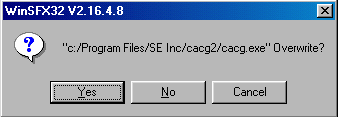
Figure-2
4. After the program is successfully done, start CG illust program and check if the top bar has the words "DELETER CG illust 2.24E".
If you have a problem with these upgrade procedures, please feel free to e-mail us.